To blog seriously, first I have to move to 2026
I’m always doing experiments, like a podcast that gets generated for me to listen to while walking my dog, images to share my runs, or a penalty game for the Oculus Quest that I built at the beginning of the pandemic. What I decided is to spend some time telling how I do it, why, and where the experimenting could end up leading.
Like any good dev, before I could start blogging I had to rebuild my site, so this time I’m going to tell you how I took (or rather, how Claude Code took) my blog to the year 2026, meaning ready for the era of agents.
The first thing I did was take my old blog made in Gatsby (remember?) and move it to Astro, which is boring. Just in case: when I say I did something, Claude actually did it, so keep that in mind unless I say otherwise.
To actually take my site from the pandemic era to the agent era, I used a site that would give me a checklist to improve. That is how I got to isitagentready.com from Cloudflare, a SORT OF Lighthouse to see, as its name says, how AI ready my site is. When I ran it the first time it came out horrible, so I set out to improve it as much as possible.
Where we started and where we got to
The first time I ran the scanner the result was sad: a single check in green, the sitemap, and I had not even done that one, Astro generates it on its own. Everything else red.
A few hours later, running the scanner as a content site, which is exactly what this blog is, the result is 100 out of 100. Level 5, “Agent-Native”. Seven of seven applicable checks, none in red. That link runs it live, you do not have to take my word for it.
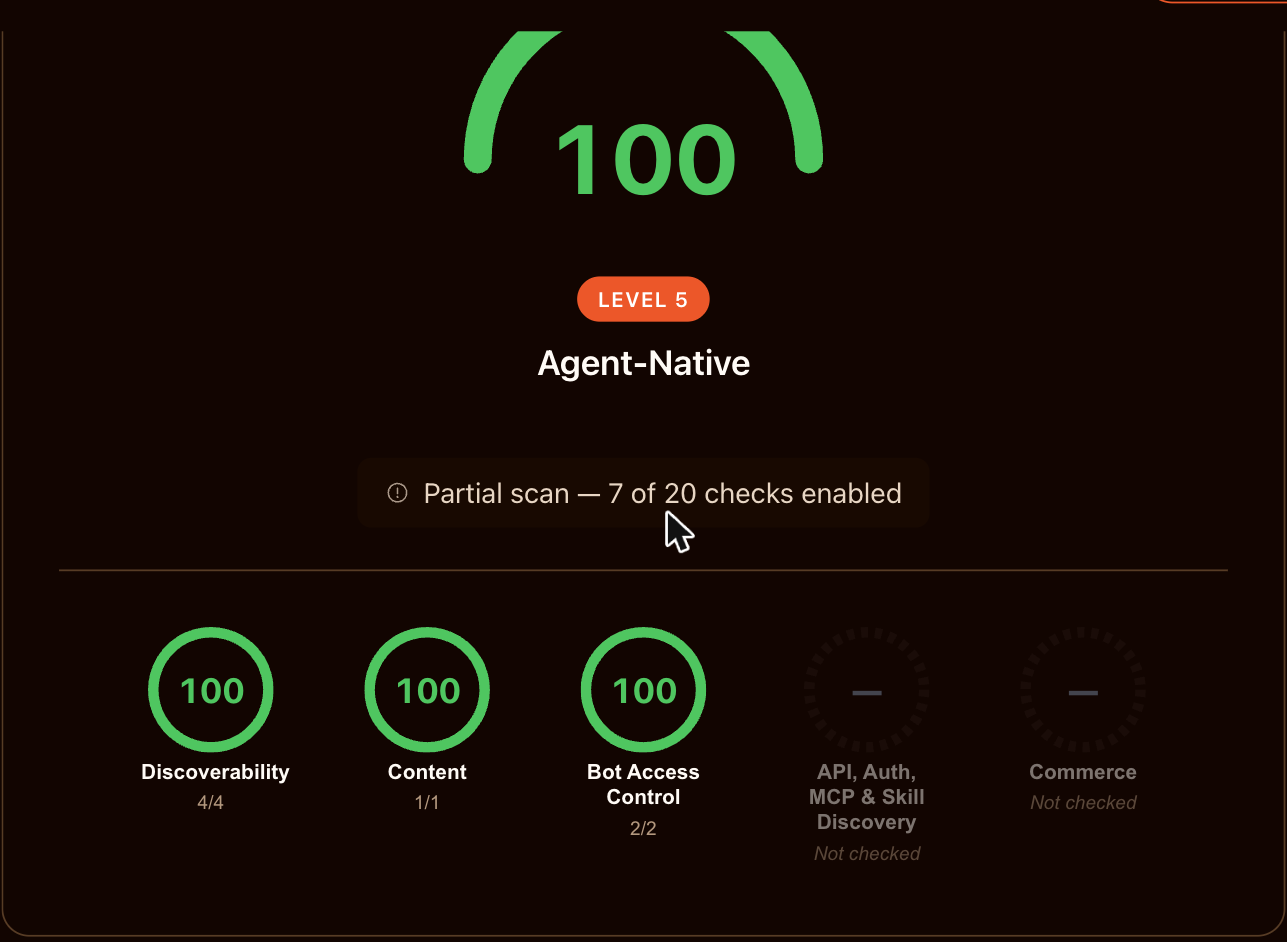
With the “All Checks” profile on, the same site scores 80. That difference is not a to-do, it is the subject of the second half of this post.
Now: this little number, Lighthouse’s, and all their cousins are vanity metrics as long as I do not understand what is behind them. A 100 I got without knowing what each check does tells me nothing about my site: it tells me I know how to fill out a form. And worse, it pushes me to pass checks I should not pass, just because they are sitting there in red bothering me.
So instead of showing the number and calling it a day, I am going to go one by one. What I did, what it does, and why it makes sense, or why it does not.
What I did, one by one
1. A Markdown twin for every page. The most important thing on the list, by far. An agent parsing your HTML is reverse engineering a text you already have. Now every URL has its .md next to it, with the metadata as frontmatter, and if you ask for the page with Accept: text/markdown it serves you that one.
2. An index you can fetch in one go. Three files: llms.txt (short, for orientation), archive.json (every post with metadata and no body) and llms-full.txt (all the text together). The one that actually gets used is the second: it is small, and an agent can read the titles and decide what to fetch instead of guessing URLs.
3. An explicit crawling policy. In robots.txt, every AI crawler named one by one: GPTBot, ClaudeBot, Google-Extended, PerplexityBot and the rest. A bot that is only covered by User-agent: * has not been given any instruction in particular. Plus a Content-Signal line per group, declaring what this can be used for.
And here comes the uncomfortable part: this is a huge hack. We are expressing content usage permissions in a plain text file from 1994, which has no way of being enforced, by adding new conventions on top of it. I am politely asking a machine to respect something, with no mechanism behind it. It works because the big companies choose to respect it, not because the system guarantees it. It is something the industry should actually solve at some point, and right now nobody is doing it.
4. An MCP server. A single function in the whole project. Three tools: list, get a post, search. It is the only thing here that turns the blog from a document you download into a thing you ask.
Now, with fewer than twenty posts, it does little. An agent fetches the index, reads the titles and that is it: it does not need a search engine. The skill I published says so itself, that the archive is small enough that reading the index is usually better than searching. The MCP starts earning its place when the archive grows. It was cheap, I left it in, and it will be more useful next year than it is today.
5. Agent Skills. Three files explaining how to read the archive, how to search it and how to cite it.
The surprise was this: I expected to write configuration, and I ended up writing editorial decisions. For an agent to cite me properly I had to decide things like what happens if it translates a quote of mine from Spanish and does not say that it translated it. Or that it should not attribute to me a summary I did not write. Or that if it finds a post marked as a draft, it is not reading my blog, it is reading a development server. None of that is technical. They are the rules for how I want to be cited, which I had never had to write down because no human reader had ever asked me.
6. WebMCP. When an agent drives a real browser, looking at the screen, it cannot hit your API: it only sees the page. WebMCP is a proposal for the page itself to hand tools to the agent that is looking at it, through a JavaScript API. So I registered the same three tools there too: the agent coming in through the browser gets the same as the one coming in over HTTP.
It is 1.8 kB inline that do absolutely nothing unless there is an agentic browser on the other side. It is a W3C Community Group incubation that almost nobody has implemented yet. It is a bet and I knew it when I made it.
7. The most boring part. JSON-LD on every page (which has existed since long before all of this and everyone consumes it), an API catalog, an ARD manifest, and an auth.md saying there is no authentication.
8. DNS records. The only ones I put in by hand, and that is where the seam showed. My domain is on Squarespace, which used to be Google Domains, and I ended up entering TXT and SVCB records by hand in a web panel. It felt very 2015. I should have the DNS on Vercel, where everything else lives, and I do not. Honest, sure, but let us be real: today nobody consumes them except this scanner.
Where all this was living in the meantime
Two things about the hosting ended up mattering more than I expected.
The first: content negotiation is a route. For this site to give you HTML or Markdown depending on what you ask for in the header does not require a server, it is a few lines in vercel.json. The site is still static. The only function in the whole project is the MCP server, and it reads the generated files from its own deployment.
The second: previews. Every branch gets a real deployment at a real URL, and for testing things like these they are excellent, because almost nothing I did can be verified locally. The scanner needs a public URL to come in. The headers are set by Vercel, not Astro. The DNS does not even exist until there is a domain. All of this can only be looked at once it is up, and the preview gives you that without touching production.
And it paid off. I had merged an ARD manifest convinced that it worked: it returned 200, it was linked from three places, it looked flawless. When I ran the scanner again it told me it was rejecting all six entries, because the spec calls the field identifier and we had written id. The fix went to a preview URL, I scanned it there, and only then to production.
You merge to main, wait twenty seconds, it is published.
What I did not do, and why
Here is the interesting part, and it is the reason the “All Checks” number is 80 and not 100.
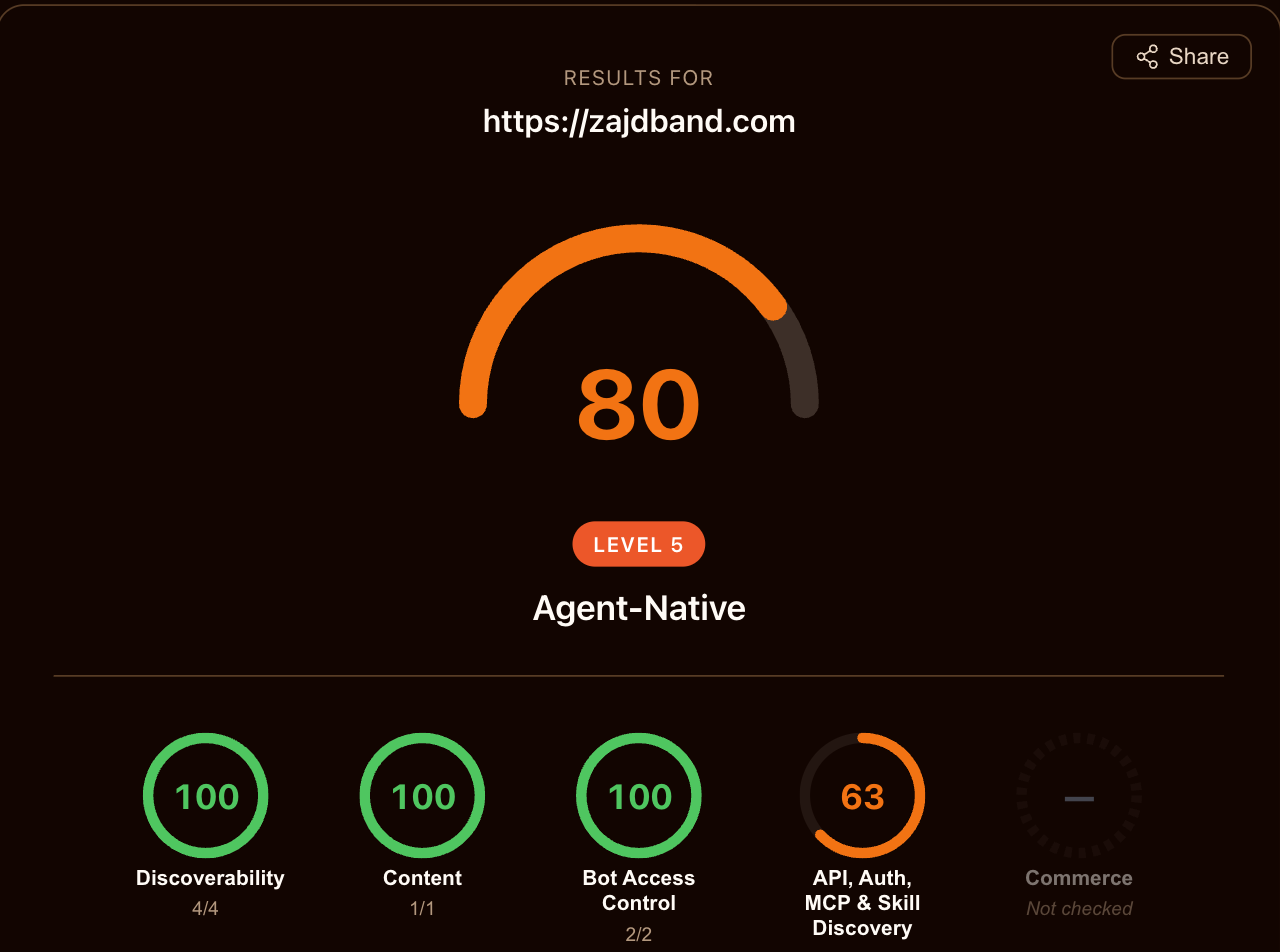
Of the checks still in red, five are payment protocols: x402, MPP, UCP, ACP, AP2. Five different consortia solving basically the same problem for a blog that sells nothing. The scanner marks them neutral as soon as it decides you are not an ecommerce, which is the most sensible decision in the whole tool.
The two that remain I left in red on purpose.
OAuth metadata, so that agents can “register securely”. There is no authorization server. There is no registration. There is nothing to protect: it is a public archive licensed CC BY. Passing that check means publishing the description of a token issuer that authenticates nobody.
An A2A agent card, declaring the name, version and capabilities of my agent. This is a blog. It is not an agent. It already speaks MCP, which is the protocol that fits.
Both are files that assert a capability I do not have, addressed to software that is going to act on that assertion with no human in between. That is my line: I publish anything that is true and cheap, and nothing that is not true at any price.
And in the end, the recipe
Getting to the end I was left with a discomfort: I was about to publish a post describing a procedure for making your site legible to machines, in prose, for you to read and do by hand. It sounded like a joke.
So I built this: any post on this blog can carry a recipe in its frontmatter. The build publishes it as an Agent Skill file, adds it to the same index where the site’s skills live, leaves a pointer in the post’s Markdown twin, and renders that block you see below with the URL to copy.
You give that URL to your agent and ask it to do it on your site.
That is the wink: the post that tells you how to make your blog agent-ready comes with the thing that makes your blog agent-ready, written for the software that is going to run it. If the post convinced you, you do not need to read it.
Closing
If out of this whole list you are going to do one single thing, do the Markdown twins. An agent parsing your HTML is reconstructing a text you already have written. Serving it the source with the metadata attached takes all the guessing work off its hands. The rest are bets on proposals we do not yet know will exist in two years. That one is not: that one is simply cheaper for everybody.
All of this together weighs about half of what the site’s HTML already weighed, and it adds fifty milliseconds to the build. Cost was never the problem. The problem was deciding what this site is allowed to say about itself.